REST API Scanner
Vooki Pro treats an API as a project — a collection of HTTP requests you can edit, send, and scan as a unit. This is separate from the web scanner because an API has no pages to crawl; the requests are the attack surface.
Create an API Project
- Open Applications and click Add.
- Set the type dropdown to API.
- Give the project a name, pick an environment and add a description. There is no base URL field — the requests carry their own URLs, and you author or import those next.
The type is fixed once created: a web target cannot become an API project later, or the other way round.
Import What You Already Have
You rarely need to type requests by hand. Vooki Pro imports:
- OpenAPI / Swagger — both v2 and v3. Every path and operation becomes a request, with parameters and example bodies filled in.
- Postman collections — folders, requests, headers and bodies carry across.
- HAR files — a capture from your browser's network tab or from a Vooki Pro recording. The import dialog previews every entry so you can untick the noise — analytics beacons, static assets — before it becomes a project.
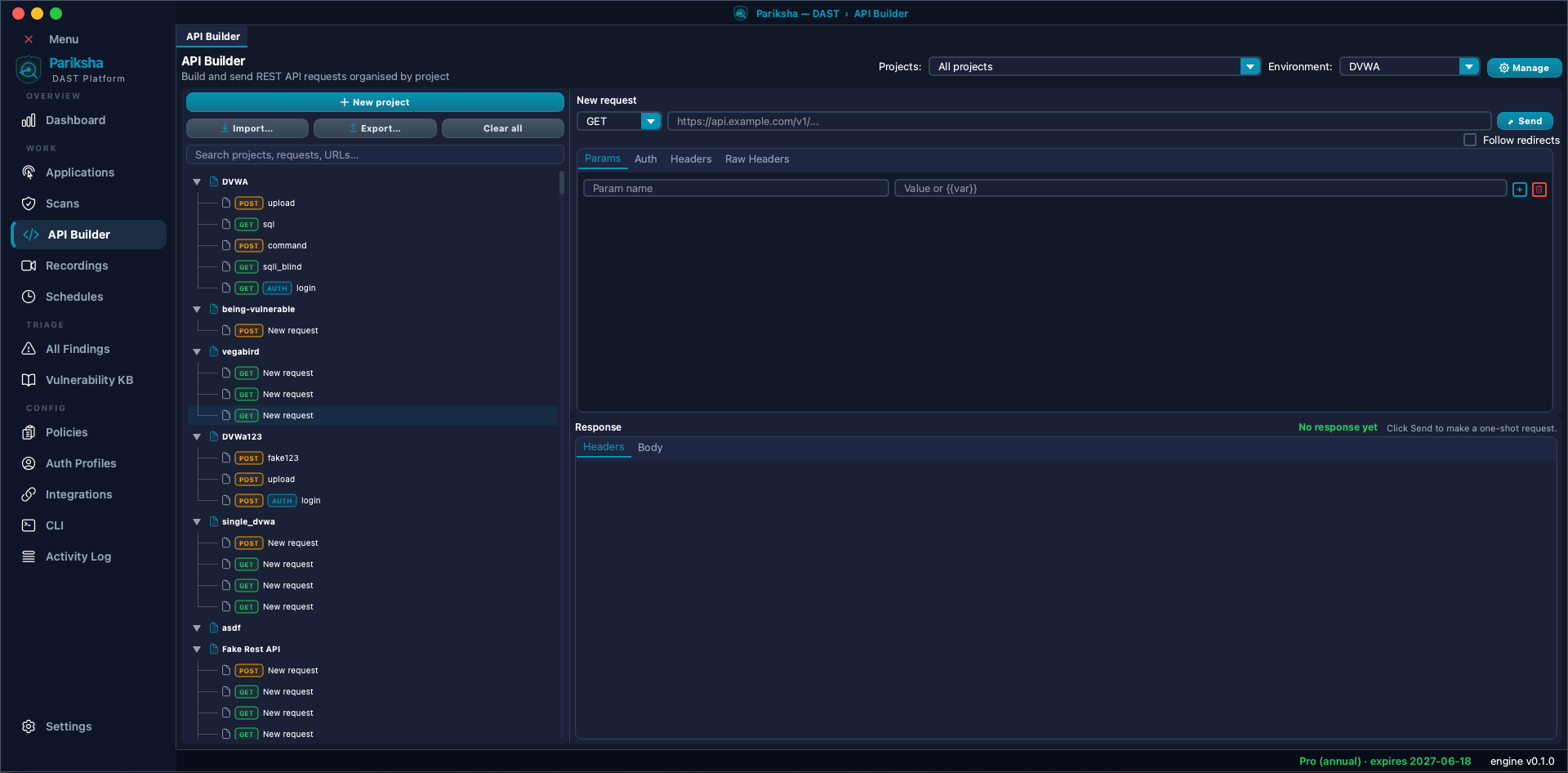
The API Builder
Open API Builder from the sidebar. It is a two-pane workspace:
- Left — your projects and the requests inside them, in a tree.
- Right, top — the request editor: method, URL, and tabs for Headers, Body and Raw.
- Right, bottom — the response viewer: status, headers and body.
Click Send to fire a request and see the live response. Use this to confirm a request works — correct auth, correct body shape — before you spend time scanning with it.
The API Builder sends requests; it does not scan them. Scanning is launched from Scans → New Scan → API, so building and attacking stay cleanly separated and you never fire payloads by accident.
Environments and Variables
Rather than editing every request when you move from dev to staging, define variables once and reference them across the project. Switch environments and the whole collection follows. This is also how you keep secrets out of individual requests.
Authentication
APIs almost always need credentials. You can set auth on a request, or apply a saved
auth profile
across the whole collection in one action — far better than pasting the same
Authorization header into a hundred requests. Supported types are bearer
token, basic auth, API key, cookie and OAuth2 client credentials.
For tokens that expire, the scan configuration can mint a fresh one at scan start rather than failing halfway through with 401s.
Scanning an API Project
- Open Scans and click New Scan, then choose the API flow.
- Project — pick the API project to scan. If you still need to import requests, jump to the API Builder tab and come back; the wizard keeps its state.
- Policy — choose which checks run, and how aggressively.
- Review — confirm and launch. As with web scans, you can Export Config here for the CLI.
Scope rules keep the scanner on the endpoints you own, with per-project include and exclude rules.
What Gets Tested
API projects get the full injection and protocol test suite, plus checks written specifically for APIs:
- OWASP API Top 10 — BOLA (object-level authorization), BFLA (function-level authorization), BOPLA (property-level authorization), mass assignment, unrestricted resource consumption, improper inventory management, unsafe consumption of APIs, server-side request forgery and versioning flaws.
- JWT handling —
alg=none, weak algorithms, algorithm confusion,jkuandkidabuse, and tokens leaked in URLs or referer headers. - GraphQL — introspection exposure, injection through GraphQL, and query-depth denial of service.
- OAuth, OIDC and SAML — sixteen checks covering state and PKCE handling, redirect URI validation, implicit flow exposure, client secret exposure, and SAML signature wrapping, replay and comment injection.
- Injection, access control, deserialization and the rest of the shared catalogue described in Scan Policies.