Scan Policies
A policy answers two questions: which checks run, and how hard the scanner pushes. Getting it right is the difference between a scan that finishes over lunch and one that is still going tomorrow.
What a Policy Is
A named selection of security checks, saved so you can reuse it. Vooki Pro ships built-in policies you cannot edit, and lets you create your own on top of them.
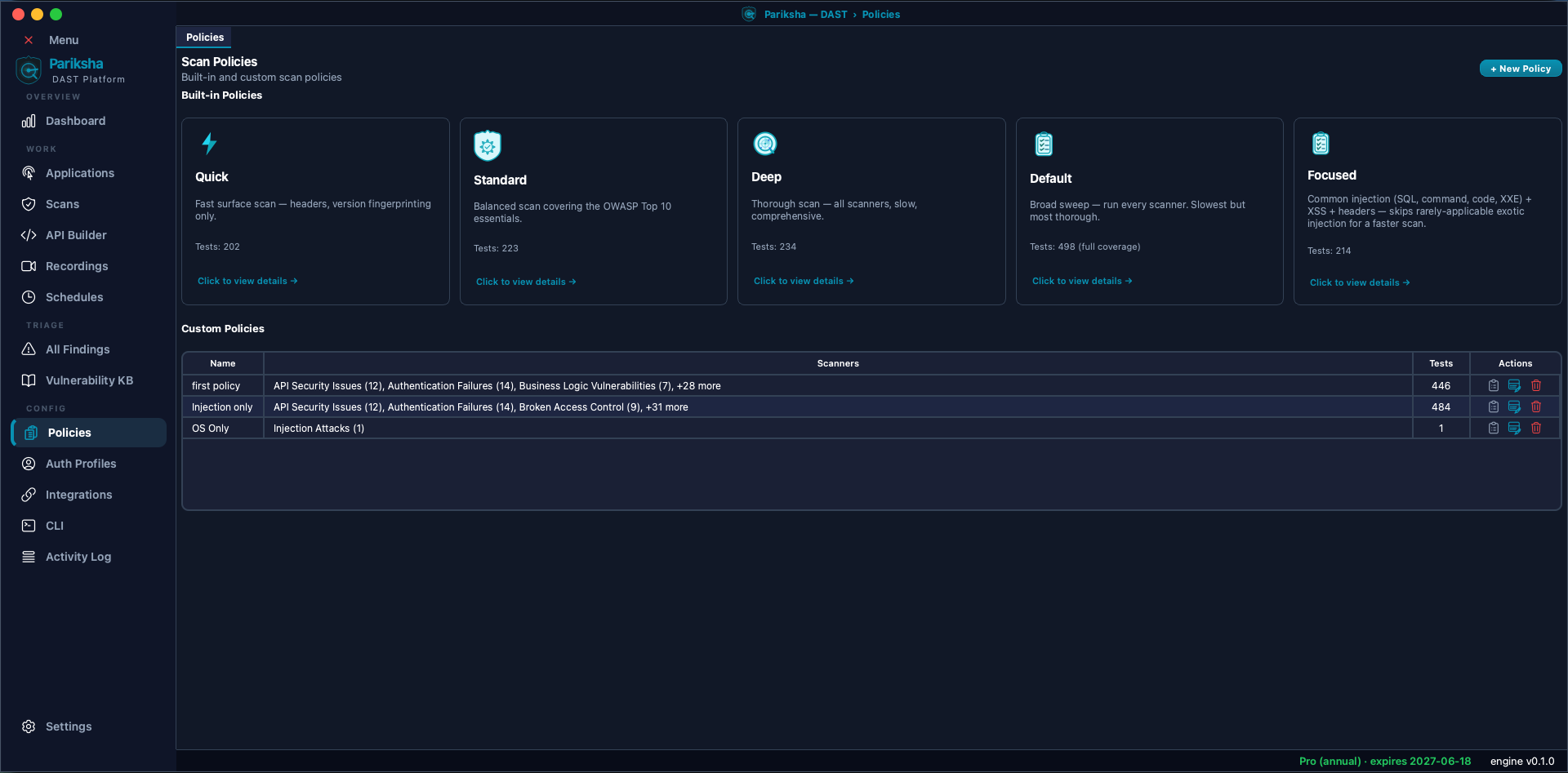
Built-in Policies
Six policies ship with Vooki Pro. The test count on each card is how many individual checks it runs, out of the 498 in the full catalogue:
| Policy | Tests | What it runs |
|---|---|---|
| Quick | 202 | Security headers and version fingerprinting only. A fast surface scan — good for a first look at an unfamiliar host, or a smoke test in a pipeline where minutes matter. |
| Focused | 214 | The high-signal injection families (SQL, command, code, XXE) plus XSS and headers. Skips the exotic injection types that rarely apply but dominate scan time. |
| Standard | 223 | Balanced coverage of the OWASP Top 10 essentials: headers, versions, injection and cross-site scripting. |
| Deep | 234 | Thorough scan across the core categories, including the slower and more specialised ones such as SSRF, SSTI and IDOR. |
| Default | 498 | Full coverage — every scanner in the catalogue. The recommended choice, and the slowest. |
| Production Safe | Passive subset | Non-intrusive GET and HEAD requests and response analysis only. No attack payloads and no state-changing tests; classes that need active testing are not evaluated. For live production targets. Details. |
Default is the widest, not Deep. Deep is a curated set of core categories that finishes faster; Default runs everything. If you are unsure which to pick, start with Default and narrow down only if scan time becomes a problem.
Production Safe (Passive)
Production Safe is the built-in policy for live targets. It sends only non-intrusive GET and HEAD requests and analyses the responses. It never sends attack payloads or state-changing requests, and vulnerability classes that need active testing are not evaluated.
- Requests that are not GET or HEAD are dropped from the target list.
- Active-only stages are switched off: the WAF attack pre-probe, browser-based endpoint harvesting, DOM confirmation, recording replay, session refresh and in-scan re-authentication. The optional AI detection (secrets and personal data) does not run either.
- The mode is enforced by the scan, not just by the policy. If it cannot be applied, such as an unrecognised mode or a missing policy, the scan refuses to start rather than running a wider scan.
- Choose it on the Policy step of the scan wizard for web and API scans. The mode carries through to scheduled scans,
rescans, retests,
.vpscanarchives and CLI configs ("testing_mode": "passive", see the CLI reference). - Reports state the scan mode and list the checks performed and the checks not tested. Compliance reports mark controls with no findings NOT TESTED rather than PASS, and JSON reports record the mode.
Because the classes that need active testing are not evaluated, a passive scan with no findings is not evidence that those classes are absent. Use an active policy where you are able to test them.
Creating a Custom Policy
- Open Policies under Config and click New.
- Name the policy, then tick the checks you want. Categories can be toggled as a group or opened up so you can select individual checks.
- Save. Your policy appears alongside the built-ins in every scan wizard.
- Custom policies can be edited and deleted; built-ins cannot.
Custom policies are how you handle the awkward cases: exclude the denial-of-service category when scanning production, drop the WordPress checks on an application that has never seen PHP, or build a tight regression policy that only re-tests the classes of bug you have been bitten by before.
The Check Catalogue
Vooki Pro exposes a wide catalogue of individually selectable checks across active attack categories, version and CVE fingerprint checks, and deep or passive analysis capabilities. The categories are:
- Injection Attacks (22) — SQL, NoSQL, blind SQL, XXE, XML, XPath, LDAP, command, SSTI, SSI, CRLF, host header, email, log, GraphQL, expression language, ORM, HTTP parameter pollution, code, XSLT and server-side JavaScript.
- Cross-Site Scripting (7) — reflected, stored, DOM-based, header-based, SVG, mutation XSS and HTML injection.
- Broken Access Control (9) — IDOR, function-level authorization, path traversal, forced browsing, privilege escalation, method-based bypass, horizontal access, path normalisation and method override.
- Authentication Failures (15) — credentials in URLs, HTTP basic over cleartext, default credentials, missing auth, brute-force exposure, user enumeration, JWT algorithm attacks, weak password policy and reset flaws.
- Cryptographic Failures (11) — deprecated TLS, TLS 1.0 and 1.1, certificate problems and expiry, weak ciphers, weak randomness, hardcoded keys, padding oracle, ECB mode and data unprotected at rest.
- SSRF & Related (6), Insecure Deserialization (6) — Java, PHP, Python pickle, .NET, JSON and XML.
- Information Disclosure (43) — stack traces, directory listings,
source code and source maps, exposed
.git, backups, API keys, PII,phpinfo, Swagger exposure, server version leakage and more. - Business Logic (7) — price and quantity tampering, workflow bypass, race conditions, integer handling, coupon abuse and rule bypass.
- API Security (12) — the OWASP API Top 10 classes.
- Security Headers (19), Cookie Security (8), CSRF (4), Session Management (7).
- File Security (8) — upload abuse, type bypass, traversal, LFI, RFI, polyglots and zip slip.
- HTTP Protocol (12) — request smuggling, h2c upgrade, verb tampering, open redirect, cache poisoning and rapid reset.
- Web Cache Deception (3), Prototype Pollution (3), Encoding Attacks (4), DNS Security (3).
- OAuth / OIDC / SAML (16), Denial of Service (7).
- LLM Security (5) — prompt injection, indirect injection, data exfiltration, resource exhaustion and training-data poisoning.
- CVE-Class Attacks (5) — Shellshock, PHP-CGI RCE, Heartbleed, Log4Shell and Spring4Shell.
- Client-Side Security (28) — clickjacking, CORS,
postMessageabuse, service worker hijacking, tabnabbing, WebSocket issues, and vulnerable versions of jQuery, AngularJS, Bootstrap, React, Vue, lodash and others. - Configuration (36) — debug modes, verbose errors, exposed admin panels, dangerous HTTP methods, cloud storage exposure, Spring actuators, container metadata, plus WordPress, Joomla and Drupal specifics.
- Version and CVE checks (177) — outdated CMS, JavaScript libraries, frameworks and runtimes, servers and proxies, databases, business applications, and DevOps infrastructure.
- Deep & Passive Analysis (3) — CVE database expansion of detected versions, WordPress active probing against a vulnerability database of around 17,000 entries, and ThreatLens passive response analysis.
Speed and Throttling
Speed is set on the Policy step of the scan wizard rather than baked into the policy, so the same policy can run gently against production and hard against staging:
- Stealth — 2 parallel requests, 2 second delay.
- Normal — 5 parallel requests, 500 ms delay.
- Aggressive — 10 parallel requests, no delay.
Setting concurrency, delay or requests-per-second explicitly overrides the preset; where two settings conflict, the larger effective delay wins.
Choosing a Policy
- First scan of an unfamiliar host — Quick, to see what you are dealing with without committing hours.
- Regular testing — Standard.
- Pre-release or pre-audit — Deep, run overnight.
- Production — Production Safe, which never sends attack payloads. For active testing, a custom policy with the destructive and denial-of-service categories removed, at Stealth speed.
- CI pipeline — a tight custom policy that finishes inside your build timeout.