Reports & Compliance
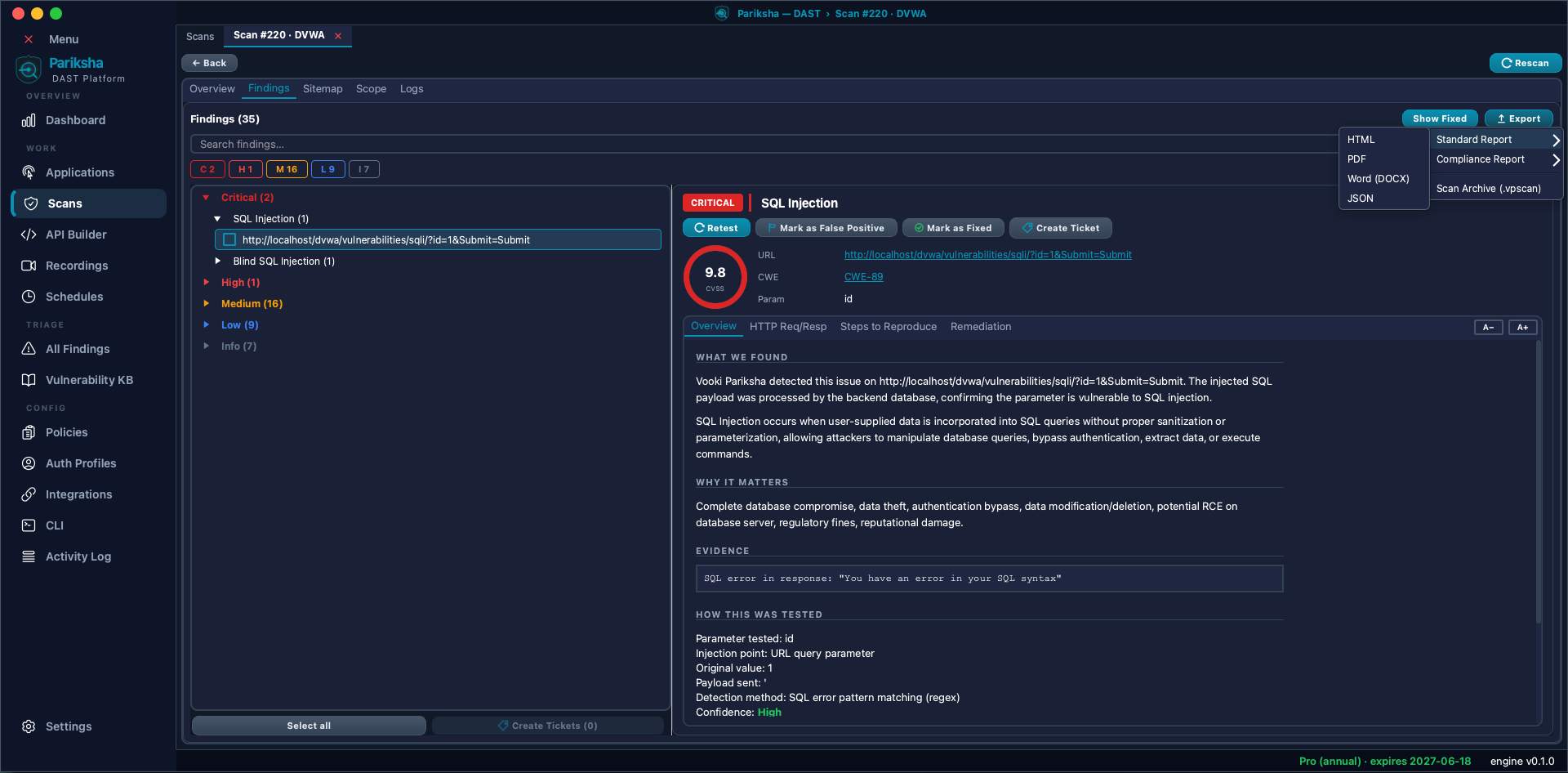
Findings only matter once somebody outside the security team can read them. Vooki Pro produces reports for two different audiences: standard reports in four formats, and compliance reports in two.
Two Kinds of Report
- Standard — the technical write-up. Findings by severity, with evidence, CVSS scoring, CWE references and remediation guidance. This is what you send to the developers.
- Compliance — the same findings re-framed against a control framework, so each issue is tied to the control it bears on. This is what you hand to an auditor.
Formats
Standard reports come in four formats:
- HTML — self-contained, opens in any browser, easy to share. The default.
- PDF — rendered from the HTML through a bundled browser engine, so it looks the same everywhere. The format auditors usually ask for.
- Word (DOCX) — when someone needs to edit the report, add context or drop sections before it goes out.
- JSON — the machine-readable form, for feeding a dashboard, a ticketing script or your own tooling.
Compliance reports are HTML and PDF only. There is no Word or JSON compliance report; a Word or JSON export is always a standard report.
.vpscan archive.Exporting a Report
- Open the scan and use its Export menu.
- Choose standard or compliance. For compliance, pick the framework.
- Pick the format and click export, then choose where to save the file.
- From the CLI, set
report_formatandreport_typein the config file — see CLI & CI/CD.
Compliance Frameworks
- OWASP Top 10 — each finding mapped to its category and rank. The common baseline for application security.
- PCI DSS v4 — for systems in scope for cardholder data.
- NIST SP 800-53 — control mappings for federal and federal-adjacent programmes.
- ISO/IEC 27001 — Annex A control references for your ISMS evidence pack.
- HIPAA — safeguards relevant to protected health information.
- GDPR — findings that bear on personal data protection obligations.
- SOX — controls relevant to financial reporting systems.
A compliance report is evidence of testing, not a certificate of compliance. It shows what was scanned, what was found and how each finding maps to the framework's controls. Your assessor decides what that means for your programme.
What Is in a Report
- Target, scan date, policy and scope — so the reader knows what was and was not tested.
- An executive summary with severity counts.
- Every finding with description, impact, affected URL and parameter, CVSS score, CWE identifier and remediation guidance.
- The request and response evidence behind each finding.
- Framework control mappings, in a compliance report.
- Findings you marked as false positives are excluded from the active list, so the report reflects your triage rather than the raw scanner output.
Scan Archives
A report is a document; the scan data is the scan itself. Export a scan as
a .vpscan archive and it carries every finding plus the underlying HTTP
request and response. Bring it back in through Scans → Import — on
the same machine or another one — and it opens exactly like a scan you ran yourself.
This is how you hand a full scan to a colleague, keep an offline record of what a scan actually saw, or pull a pipeline scan back onto a workstation for triage.
Activity Log
The Activity Log under Config is an append-only audit trail of what happened in the application and when. It exists because SOC 2 and PCI assessors ask for evidence that testing is controlled, not just that it occurred.